
What are the Most Potential Devices of Samsung Other Than S24 Series
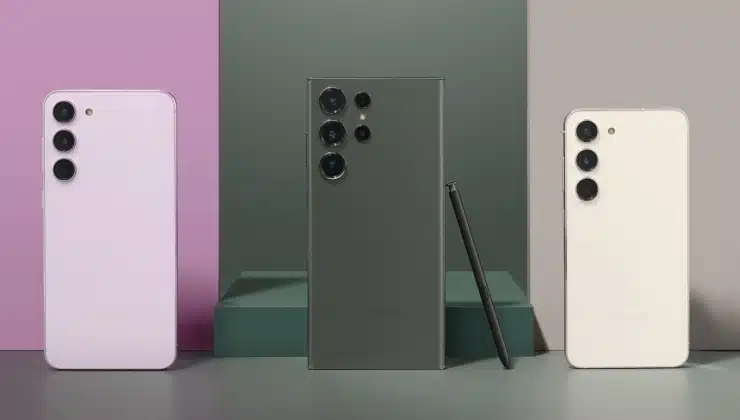
Samsung redefines smartphone trends every year with the launch of new models. In 2023, they will launch incredibly innovative devices for technical geeks and regular Android users. This guide unveils some top devices other than the S24 Series expected to be released this year.
Furthermore, if you’re looking forward to buying a new Samsung model, you will need a safe data transfer app to preserve your data. This article will present the best app to transfer data from Android to Android, through which you can transfer data in seconds.
Part 1: The Most Demanding Devices of Samsung in 2023 Except S24 Series
Before diving deep to find the Android-to-Android transfer app, here is an interesting section people often search about. In this part, we have enlisted the most demanding devices of Samsung in 2023, except the S24 Series. So, let’s explore them one by one, along with their features:
1. Galaxy A55 5G
Some reports say Samsung is working on its new Galaxy A55 5G smartphone, which will have an octa-core Exynos chipset processor. The camera system is expected to contain a 50MP sensor camera, a highly efficient primary camera, and a selfie camera. Additionally, you can expect a 6.5-inch display with a high-resolution screen.
Other than that, leaks claim that Android users can expect two variants of 128GB and 256GB storage. Some highlights reveal that this device may run on a non-removable Li-ion 5000mAh battery. All these features will make it an excellent innovation for Android lovers in 2023.
2. Galaxy M55 5G
With a few advancements in its previous model, the Galaxy M55 G5 will be the successor of Samsung’s M series. According to some reports, it will be released with a slightly larger display than its predecessor. Plus, users can expect a Snapdragon processor to run multiple apps smoothly.
Moreover, fresh details about its camera claim that it will include three back and a front camera. This model will also include a 6000mAh battery with fast charging support. Storage is expected to reach 128GB with fast processing RAM.
3. Galaxy Z Flip 6
Samsung’s Galaxy Z Flip 6 is the next big thing expected to be launched this year. There are many rumors about this device, but a Galaxy Club report shows that this smartphone would have a 50MP primary telephoto camera for versatile photography. It even claims that the device will have a more extensive cover display of 3.9 inches than its predecessor.
Flip 5 was released with a reasonable 3700mAh battery, so Samsung may improve the battery’s capacity in the Galaxy Flip 6 to extend its longevity. Additionally, users can expect the capability to charge fast, just like the previous model. According to some leaks, Samsung will release this model in the market in July or August 2023.
4. Galaxy Z Fold 6
The anticipated foldable Galaxy Z Fold 6 is about to present new innovations in users’ lives. The previous Samsung foldable models have already set high standards, but this smartphone may exceed them. Some rumors suggest that the Fold 6 model will be more potent than its predecessors and will be released in August 2023. Also, Samsung may tweak the cover screen aspect ratio to display more details.
Moreover, you can expect different camera modules in Galaxy Fold 6, including a 50MP camera sensor, a 12MP wide-angle camera, and a 10MP telephoto lens. Besides that, Samsung may add a Snapdragon 8 Gen 3 processor, which would be a better chipset version. For some users, storage is the primary concern, and they can hope for a base configuration of 12/256GB and 1TB storage in the top variant.
Part 2: Try Out This Robust Data Transfer Tool for Android Users – Wondershare MobileTrans
Android users love to use new models, so they have to transfer data from old devices after purchasing newer ones. For that purpose, they need a reliable app to transfer data from Android to Android phones. To help them transfer unlimited files, Wondershare MobileTrans provides the most effective solution to transfer 18+ types of data, including videos, photos, and more.
If you are wondering how to transfer data from Huawei to Samsung, this tool can help with this matter, as it supports all major brands. Other than that, this data transfer tool presents a one-click solution to exchange data between connected devices. You can also use this phone transfer app to move the data from iCloud to your Android smartphone without OS restrictions.
Prominent Features of Wondershare MobileTrans
- This tool helps transfer all data without overwriting existing files and moving through complex steps.
- With MobileTrans, users can send or receive data on over 6000 Android devices after creating a seamless connection.
- Users can share data relatively faster than Bluetooth and other third-party applications without the internet.
Easy Steps to Transfer Data from Android to Android Using Wondershare MobileTrans
Your happiness in buying a new phone can turn to frustration when you have to transfer all the data from the old one. Simply follow this step-by-step guide to send data from your old phone to the newer one using the Phone Transfer tool of Wondershare MobileTrans:
Step 1. Proceed With the Phone to Phone Transfer Tool
Begin with downloading and installing Wondershare MobileTrans on your Windows PC or MacBook. Once the tool is launched, go to the “Phone Transfer” tab from the top bar of the dashboard. On the next screen, you will see different transfer functions for multiple devices, from which you have to select the “Phone to Phone” option to start the related process.
Step 2. Connect Old and New Android Smartphones
Connect your old and new Android phones to the computer using original USB cables. Once the devices are connected successfully, MobileTrans detects them and shows them as “Source” and “Destination” to let you maintain the right direction of data transfer. If you want to switch their positions, hit the “Flip” option given in the middle. Afterward, scroll and select desired data types and click the “Start” button to transfer them.

Step 3. Ensure Phones Stay Connected Until Completion
When you give the start data transfer prompt, the tool moves data from the source to the destination device. Then, you need to ensure the devices stay connected to your computer until all the data has been migrated successfully. Here, users can track the counting of transferred videos, photos, documents, contacts, and voice memos.
Wrapping Up
This article unleashed the top 5 upcoming devices of Samsung, except the S24 Series, which can catch the interest of Android lovers. We have also explored the most innovative and fast app to transfer data from Android to Android that helps you transport data after buying a new phone. Also, Wondershare MobileTrans facilitates users with many handy features and ultimate compatibility support.


